

Link forwarding is way to have a URL automatically forward, or redirect, to another URL and track the person who visited the URL.
Link Forwarding is similiar to Link Aliasing. Link Aliasing assigns an alternate name to the URL. Link Forwarding causes the visitor to jump to a different page. Typically, Link Aliases are permanent. Link Forwards, on the other hand, can be easily changed. Also, search engine robots will not index Link Forwards URLs. They will remember Link Alias links.
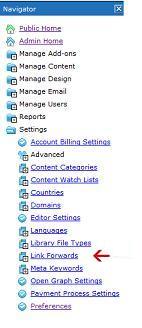
To use Link Forwarding, LOGIN and click on ADMIN HOME. In the navigation menu on the left side of your screen click on Settings and then Link Forwards as shown below:
This will show a list with all pages that have link forwards. Click on the paper/pencil icon to edit an existing link forward, or click on ADD at the top of the screen to add a new link forwarding page. You will see the following screen:
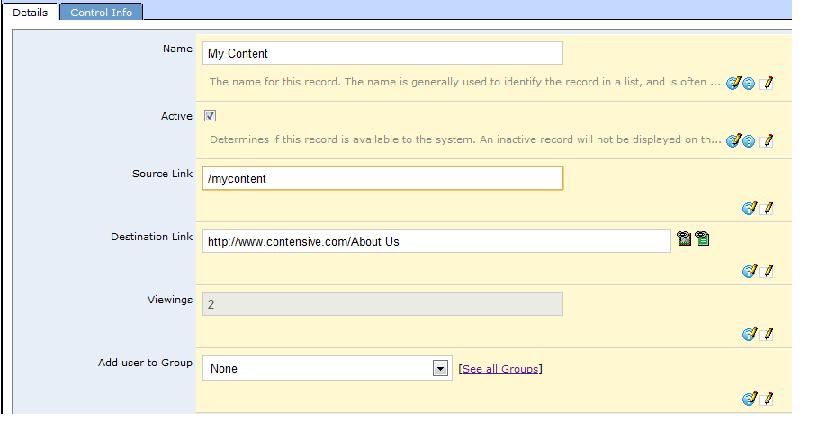
Here you will enter the page name and source link for the page that you would like to be forwarded and in the Destination Link field you enter the page that website visitors will be redirected to.
Example
Lets say you want to create temporary links to track your Google Adwords campaigns.
- Go to your site, and under the 'Home' page, create a new child page and build a landing page for your product.
- Give it a Link Alias "/My Product".
- Now go to Link Forwards and create a forward for your first Google campaign, called "/Google1" that forwards to "/My Product".
- Then create "/Google2" that also goes to "/My Product"
- Setup your first Google Adwords campaign with the URL http://www.MySite.com/Google1, and second campaign to http://www.MySite.com/Google2
Now as your campaign runs, you can track the day-to-day traffic on each of these URLs against your conversions and expenditures.